
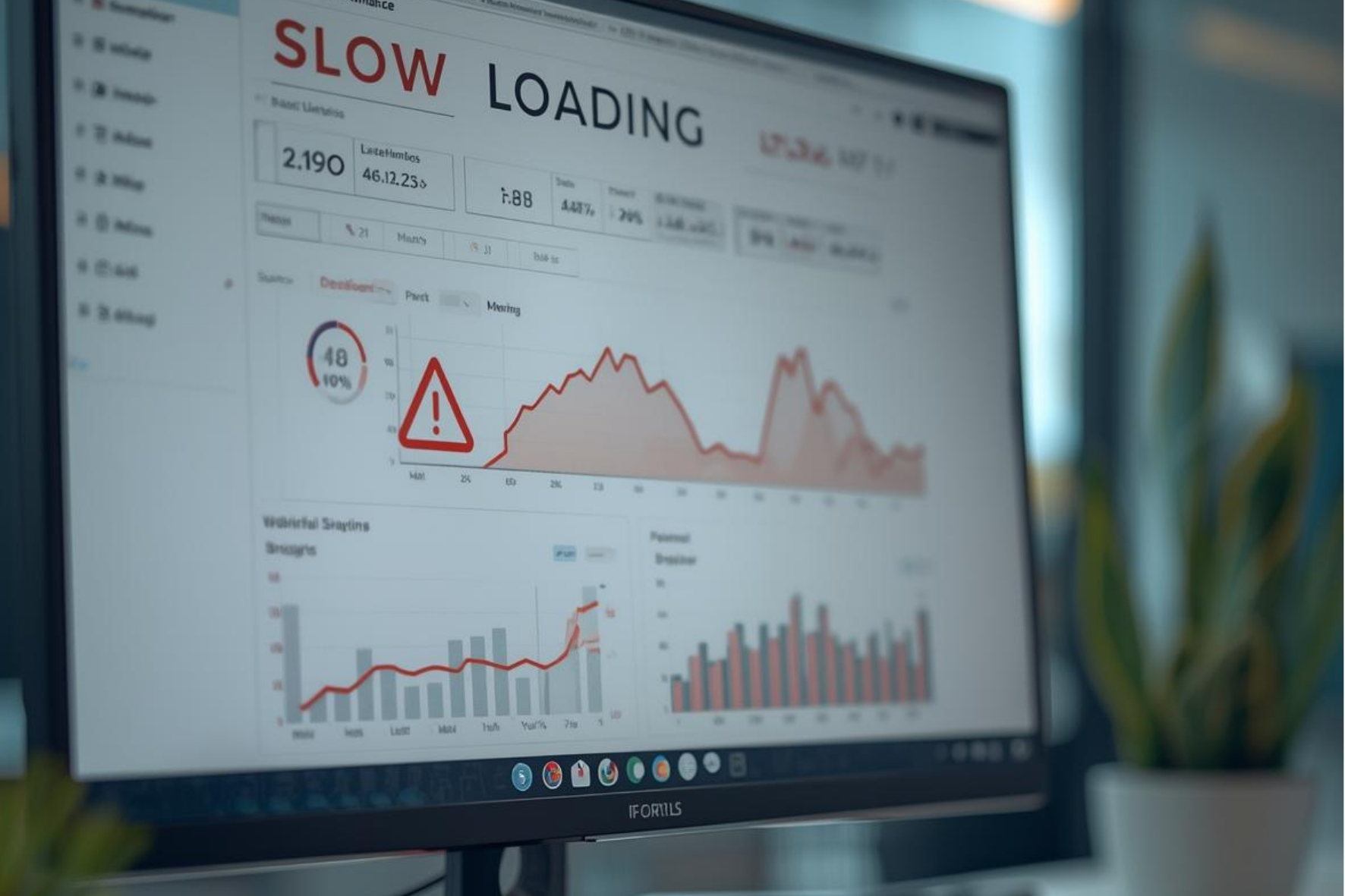
CMS Performance Optimization to Boost Site Speed & SEO
Conclusion
Optimizing CMS Performance
The success of a website hinges upon the CMS performance optimization (Content Management System) performance. With a well-optimized CMS, users will have an improved user experience when visiting your site and also higher SEO rankings due to having fast loading pages. A CMS that is slow will frustrate customers, cause them to leave your website quickly and dramatically increase the number of people bouncing off your page. Therefore, it is critical that you optimize the performance of your CMS to prevent performance issues.
Regularly updating and maintaining "CMS" is very important in maintaining the overall health of your "CMS". Regular updates and maintenance services can prevent most of the common causes of a poorly performing CMS. Caching and Content Delivery Networks (CDN's) are two acts that dramatically reduce the time it takes for your web pages to load by delivering content to users faster than traditional methods.
In this guide, we are going to discuss some different techniques that you can use to Optimize the Performance of your CMS and to improve both speed and efficiency of your "CMS".
CMS Performance Matters
The performance of a CMS can have a direct effect on user experience. A website that loads pages quickly can keep the user engaged, while a slow website can lead to a high bounce rate. In addition, search engines rank websites that load pages in a faster manner, thus improving the visibility of the website, which can aid in customer retention.
Common CMS Performance Issues and Their Causes
- CMS issues can significantly impact website usability, especially when pages load slowly due to poorly optimized images and an excessive number of plugins. Large image files are one of the main contributors to slow loading times.
- Server response time is another major concern. Inefficient servers or poorly optimized database queries can increase response times, leading to slow page loads and frustrated visitors.
- A high number of HTTP requests per page can further delay the loading process, as the browser must fetch multiple resources before displaying the page.
- Reducing the number of HTTP requests—by combining files, removing unnecessary plugins, and optimizing assets—can help the CMS load faster and improve overall user experience.
Common CMS performance issues include:
- Slow page load times,
- Low server response times, and
- Excessive numbers of separate HTTP requests.
Being aware of the various problems associated with your CMS is key to performing accurate troubleshooting. By identifying the root cause of a problem, you can pinpoint exactly how to optimize it; this leads to increased performance and improved user experience.
CMS Performance Best Practices and Optimization Checklist
- Regularly follow CMS optimization best practices to take advantage of the latest updates and improvements that enhance overall functionality and performance.
- Ensure an efficient caching mechanism is implemented to enable faster server responses and improved page load times.
Use a Content Delivery Network (CDN) to deliver cached content from the nearest servers, reducing latency and improving website speed. - Optimize images by compressing them without compromising quality to ensure faster loading across all devices.
- Remove unused or unnecessary CSS, JavaScript, and HTML code to reduce page weight and improve performance.
- Continuously monitor website speed and performance metrics to identify and resolve bottlenecks promptly.
Key best practices for CMS performance:
- Regularly follow CMS optimization best practices to benefit from the latest updates and performance improvements.
- Implement an efficient caching mechanism to ensure faster server responses.
- Use a CDN to deliver cached content with minimal latency.
- Compress and optimize images to reduce load times.
- Remove unused CSS, JavaScript, and HTML code to improve website speed and efficiency.
Optimization checklist for your CMS:
- Minimize CSS, Javascript, and HTML Files (inline styles, images) into a single file or a series of files, including comments.
- Optimize Your Database Regularly
By following the above practices, you will create a very solid foundation for running a well-optimized CMS and continue to improve your site. Ensure that your CMS continues to be fast, secure, and user-friendly by conducting regular audits and monitoring systems regularly. Take note of any areas that need improvement.
How to Speed Up Your CMS Website: Actionable Strategies

- Speed is a critical requirement for any CMS, as users are unlikely to wait for slow-loading pages.
- Optimization techniques should be applied to improve overall CMS performance.
- Use lazy loading so images and videos load only when they come into view, reducing initial load time.
- Reduce HTTP requests by optimizing scripts, stylesheets, and page resources.
- These improvements help increase page loading speed and enhance CMS performance.
Steps to reduce load times:
- Implement lazy loading to optimize media loading and reduce HTTP requests, resulting in faster page load times.
- Enable browser caching so pages are stored locally, improving load speed on repeat visits.
- Regularly review the CMS for performance issues caused by excessive plugins.
- Identify and fix poorly written or inefficient code to maintain optimal website performance.
Tools for ongoing optimization:
- Take advantage of browser caching
- Perform performance audits regularly
Take a look at your current hosting plan; upgrading to better servers can provide increased resources to address your traffic spikes. By systematically implementing these suggestions, you'll be on the path to achieving significant performance gains for your entire CMS.
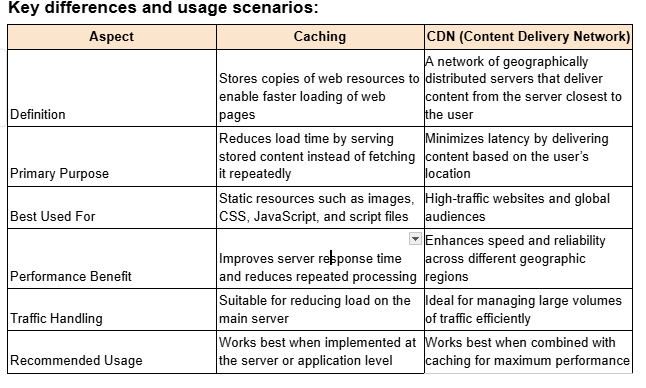
CMS Caching vs CDN: What’s the Difference and When to Use Each
Caching temporarily stores website data in the browser or server to enable faster page loading on repeat visits. CDNs deliver website content from the nearest server to the user’s location, ensuring quicker access and improved performance.
CMS Speed Optimization for eCommerce Sites
Optimizing CMS performance is critical for eCommerce websites, as page speed directly impacts sales, conversions, and user experience. Slow-loading stores risk losing customers, especially with high traffic and complex transactions.
Key strategies to improve eCommerce CMS speed include optimizing product images, minimizing HTTP requests by combining CSS and JavaScript files, and using lazy loading to load images only when visible. Regular performance checks and keeping the CMS and plugins updated help ensure faster load times and a smoother shopping experience.
WordPress vs Headless CMS Performance
Performance is a primary area that differs between WordPress and Headless CMS. Though there are many plugins in the case of WordPress, poorly managed plugins could end up slowing down a website.

In a Headless CMS, it decouples the front end and backend, which allows for faster delivery of content.
Advantages of a Headless CMS:
- Scalability: Scalable for large traffic
- Quick Load Time - Load time optimization
- Enhanced Flexibility: Allows multiple frontend frameworks to work together
The choice between them depends on the technology or the user experience requirements you have. Headless CMS systems are ideal for performance-based projects, and WordPress is more ideal for non-technical teams.
CMS Performance Optimization for Mobile
Mobile cms performance is also important, especially as mobile traffic is increasing. Making the experience seamless for the desktop as well as mobile helps in retaining customers as well as boosting conversions.
Although responsive design is an essential element, it should not be implemented alone. Some of the most crucial aspects of mobile optimization are image optimization, implementation of browser caching, and lazy loading. Testing and validation of mobile optimization are carried out through Google Lighthouse.
How to Optimize CMS Performance for SEO and Core Web Vitals
Specifically, the optimization of the CMS to perform well is necessary if one is to achieve good SEO and user experience, since Google Search rankings include the use of Core Web Vitals to determine the quality of content.
Core Steps for Optimization:
- Use Compact CSS and JavaScript to improve loading speed
- Increase Response Time on the Server with Caching and CDN
- Image and video compression, as well as appropriate formats
Performing regular reviews and constantly using tools such as Google Page Speed Insights allow you to monitor your CMS and ensure that your website is fast, stable, and search engine friendly.
Fixing a Slow CMS Website: Troubleshooting and Solutions
Performance reviews carried out regularly, as well as continuous observation, contribute to optimal speed stability for the CMS. Google PageSpeed is one of the tools that make it easy to detect any issues to ensure good SEO performance.
Common Solutions to Explore:
- Optimize databases with regular cleanups
- Use only the required plugins.
- Use Lightweight Themes for Faster Loading
- Enable lazy loading of media resources
The analysis of the speed and scalability of the CMS options available on the internet, including WordPress, Joomla, and Drupal, helps you make the right choice regarding your requirements.
Conclusion
Continuously optimizing a CMS is necessary for maintaining the efficiency of websites. It is also necessary to carry out audits to take advantage of new opportunities.
Analyzing your CMS performance should be an ongoing function and not a one-time task. Performance analytics should identify your CMS strategies to keep your site performing well.
It is important to involve both developers and marketing teams. This will ensure that optimization is done on all aspects. This will ensure that you optimize both the tech aspects and business aspects.
Let Advera create a winning strategy that drives engagement, growth, and measurable results.
Get started today at Advera.us.
Ready to double your leads and dominate local search?
Connect with a trusted digital marketing agency Dallas today and start driving real growth through smart PPC campaigns.
/contact-usMore Insights & Tips



Ready to Grow Your Roofing Business? Let's Talk
It's time to take your roofing company's digital marketing to the next level. Book a free consultation with us today, and let's discuss how we can help you generate more leads and win more jobs.